AI SVG Generator Time Savings: Accelerate Your Design Workflow by 10x
By SVGAI Team
ai svg generatordesign workflowtime savingsproductivitysvg generator
Time is the most valuable resource in any creative workflow. Traditional vector graphic creation demands hours of skilled labor for each asset—hours that compound into days and weeks across projects. An AI SVG Generator fundamentally changes this equation, compressing hours of work into seconds.
This guide breaks down exactly how AI-powered SVG generation transforms design workflows, with real metrics, practical optimization strategies, and frameworks for measuring your own time savings. Whether you're a solo founder, a designer on deadline, or a team lead optimizing creative operations, understanding these time dynamics is essential for modern design work.
The Hidden Time Tax of Traditional Design
Every design task carries invisible time costs that rarely make it into project estimates. Understanding the full scope of traditional design time investment reveals why AI generation creates such dramatic efficiency gains.
Breaking Down Traditional Icon Creation
Creating a single custom icon through traditional methods involves more steps than most realize:
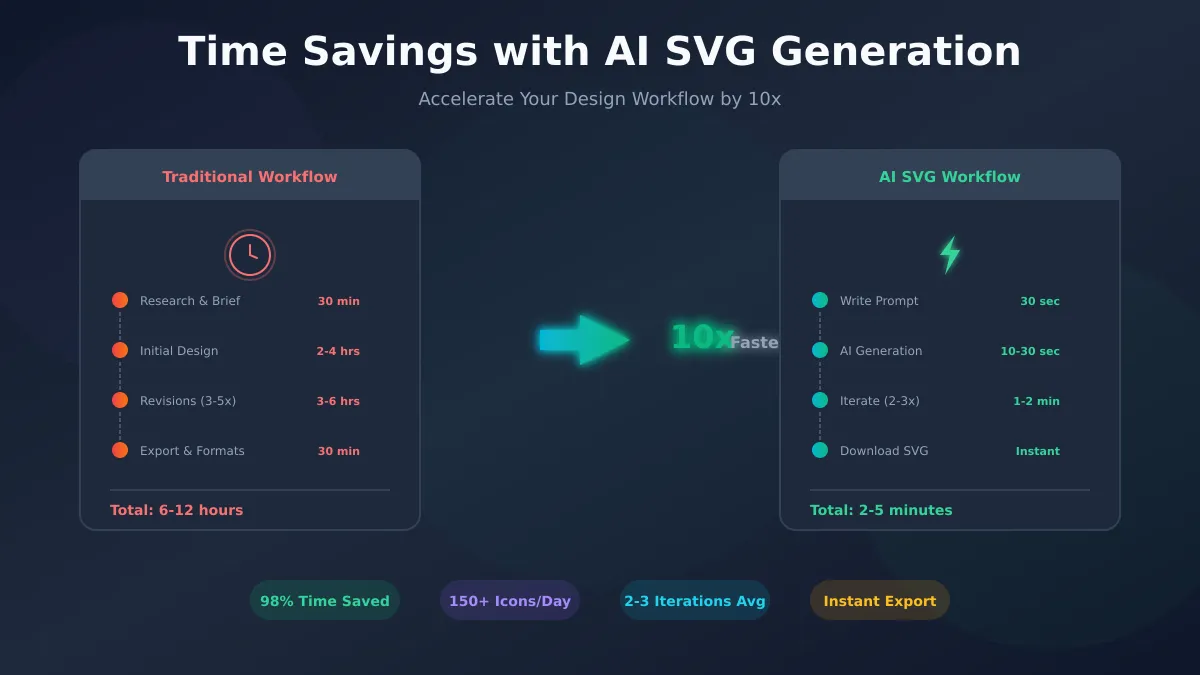
Research & Reference (15-30 minutes)
- Reviewing existing brand guidelines
- Gathering style references
- Understanding the intended use context
- Sketching initial concepts
Vector Creation (30-60 minutes)
- Setting up the artboard and grids
- Drawing initial shapes and paths
- Refining bezier curves and anchor points
- Adjusting proportions and optical balance
Iteration & Refinement (30-90 minutes)
- Stakeholder review and feedback collection
- Implementing revision requests
- Fine-tuning details based on context
- Ensuring consistency with existing assets
Export & Documentation (10-20 minutes)
- Exporting at required sizes and formats
- Organizing files for handoff
- Updating asset libraries
- Creating usage documentation
Total: 1.5-3+ hours per icon
For a typical UI requiring 50-100 icons, traditional workflows demand 75-300 hours of design time. That's 2-8 weeks of full-time work for icons alone.
The Revision Cycle Problem
Revision cycles represent the largest hidden time sink in traditional design. Each feedback loop typically involves:
- Communication overhead: 15-30 minutes explaining changes needed
- Designer context switching: 10-15 minutes returning to the project
- Implementation: 20-40 minutes making requested changes
- Re-review: Variable time waiting for stakeholder availability
Industry data shows most design assets go through 3-5 revision cycles before approval. At 45-85 minutes per cycle, revisions alone add 2-7 hours per asset—often exceeding the initial creation time.
One mobile developer shared their experience creating a password management app icon library. What started as a "simple" 150-icon project turned into weeks of back-and-forth with freelancers, struggling to maintain consistency across categories like login screens, WiFi settings, server icons, and identity cards. The revision overhead nearly tripled their projected timeline.
AI SVG Generation: The Time Compression Effect
AI-powered generation doesn't just speed up individual steps—it eliminates entire phases of traditional workflows.
The AI Generation Timeline
Prompt Writing (30 seconds - 2 minutes)
- Describe what you need in natural language
- No technical drawing skills required
- Builds on previous successful prompts
AI Processing (10-30 seconds)
- Neural network interprets your description
- Generates optimized vector paths
- Produces clean, scalable SVG output
Evaluation & Iteration (1-5 minutes)
- Review generated output immediately
- Refine prompt if needed
- Generate variations instantly
- Select best result
Download & Use (Instant)
- Direct SVG download
- No format conversion needed
- Ready for implementation
Total: 2-8 minutes per design
The math is stark: what takes 1.5-3 hours traditionally completes in under 10 minutes with AI. That's a 90-95% reduction in time per asset.
Why AI Iteration is Different
Traditional revision requires the full feedback loop: communicate, wait, implement, re-review. AI iteration happens in real-time with zero communication overhead.
Traditional Revision:
"The icon needs to feel more dynamic"
↓
Wait for designer availability (hours/days)
↓
Designer interprets feedback (variable success)
↓
New version delivered
↓
Review and potentially repeat
AI Iteration:
"Minimalist running icon, static pose"
↓
[Not quite right - needs more energy]
↓
"Dynamic running icon with motion lines, minimalist style"
↓
[Better - try one more direction]
↓
"Minimalist runner mid-stride, subtle forward lean, speed lines"
↓
[Perfect - download]
We know the frustration of editing prompts 10+ times to get the right result. But even extensive iteration completes in minutes, not the hours or days of traditional revision cycles. Average prompt refinement across our users is 2-3 iterations to reach the desired output.
Real-World Time Comparisons
Abstract percentages matter less than concrete examples. Here's how time savings play out across common design scenarios.
Scenario 1: Startup MVP Launch
The Challenge: A SaaS founder needs 40 UI icons, a logo, and 10 feature illustrations for their product launch.
Traditional Approach:
| Asset Type | Quantity | Time Each | Total Time |
|---|---|---|---|
| UI Icons | 40 | 2 hours | 80 hours |
| Logo concepts | 5 | 4 hours | 20 hours |
| Illustrations | 10 | 6 hours | 60 hours |
| Total | 160 hours |
At $75/hour freelance rates, that's $12,000 and 4+ weeks of calendar time.
AI-Powered Approach:
| Asset Type | Quantity | Time Each | Total Time |
|---|---|---|---|
| UI Icons | 40 | 5 minutes | 3.3 hours |
| Logo concepts | 20 | 3 minutes | 1 hour |
| Illustrations | 10 | 8 minutes | 1.3 hours |
| Total | 5.6 hours |
Using Pro subscription ($39/month with 350 credits), cost is under $50 total.
Time saved: 154 hours (96%)
One founder designed a custom octopus mascot for their SaaS that now appears throughout their product—hero sections, CTAs, data dashboards—all generated from AI prompts. The entire brand system cost less than a single freelance logo design consultation.
Scenario 2: E-commerce Product Library
The Challenge: An online store needs 500 product category icons and 50 promotional illustrations.
Traditional Approach:
- In-house designer: 550 hours ($27,500 at $50/hour loaded cost)
- Agency partnership: $15,000-25,000
- Timeline: 3-4 months
AI-Powered Approach:
- Generation time: 50-70 hours
- Cost: $200-400 in credits
- Timeline: 1-2 weeks
Time saved: 480+ hours (87%)
For detailed ROI analysis of AI SVG generation, see our complete cost-benefit breakdown.
Scenario 3: Marketing Campaign Sprint
The Challenge: Marketing team needs 25 social media graphics by end of week.
Traditional Approach:
- Rush freelance fees: $150-200 per graphic
- Total cost: $3,750-5,000
- Risk: Quality compromises under time pressure
AI-Powered Approach:
- Generation: 2-3 hours total
- Cost: $25-50 in credits
- Quality: Consistent across all assets
Time saved: 20+ hours
The marketing team can now iterate on concepts in real-time during brainstorming sessions rather than waiting days for mock-ups.
Workflow Optimization Strategies
Maximizing time savings requires intentional workflow design. These strategies compound the inherent speed advantages of AI generation.
Strategy 1: Prompt Template Libraries
Building reusable prompt templates eliminates repeated thinking for similar assets.
Icon Template Example:
"[Action/object] icon, [style: minimalist/detailed/geometric],
[color specification], consistent with [brand/system] aesthetic,
works at [target size], [specific requirements]"
Logo Template Example:
"[Industry] company logo, [style direction], represents [core values],
[color palette], [constraint: no cliché imagery like X, Y, Z],
suitable for [primary use case]"
Experienced users report 30-40% faster generation once they've built effective template libraries. Store your best-performing prompts in a document you can reference and adapt.
Strategy 2: Batch Generation Sessions
Grouping similar asset creation into focused sessions reduces context-switching overhead.
Batch Session Structure:
- Preparation (10 minutes): Define all needed assets for the batch
- Generation sprint (30-60 minutes): Create all assets with minimal breaks
- Review & refine (15-30 minutes): Quick iteration on any that need adjustment
- Organization (10 minutes): File and document all assets
This approach creates 20-30 assets in the time traditional methods produce 1-2.
Strategy 3: Style-First Approach
Establish style consistency before creating individual assets.
- Generate 5-10 style exploration pieces
- Select the direction that best fits your needs
- Document the winning prompt elements
- Apply consistently across all subsequent generations
This front-loaded investment (30-60 minutes) saves hours of style-matching later.
Strategy 4: Progressive Refinement
Start broad, then focus—don't over-specify initial prompts.
Round 1: Basic concept
"Modern logo for fitness app"
Round 2: Add direction based on results
"Modern geometric logo for fitness app, represents upward progress"
Round 3: Fine-tune specifics
"Modern geometric arrow logo for fitness app, gradient from teal to purple, clean minimal lines"
Each round builds on learning from the previous output, avoiding wasted iterations from over-constrained initial prompts.
Integrating AI Generation with Existing Tools
AI generation works best as part of a complete workflow, not a replacement for all design tools.
The Hybrid Workflow
AI Generation Strengths:
- Rapid concept exploration
- Initial asset creation
- Style-consistent bulk production
- Non-designer empowerment
Traditional Tool Strengths:
- Pixel-perfect adjustments
- Complex custom illustrations
- Established brand system compliance
- Animation and interaction design
Optimal Workflow:
AI Generation → Vector Editor Refinement → Design System Integration
     ↓                    ↓                        ↓
  (Minutes)            (Minutes)               (Automated)
Our SVG generator exports clean SVG files that import directly into Figma, Illustrator, or any vector editor for final refinement when needed.
Tool Integration Points
Figma Integration:
- Generate SVG with AI
- Copy SVG code or drag file to Figma
- Ungroup and adjust individual elements
- Add to component library
Illustrator Integration:
- Generate and download SVG
- Open in Illustrator (preserves all paths)
- Apply brand colors via swatches
- Save to Creative Cloud Libraries
Design System Integration:
- Generate base icons with consistent style
- Import to design system tool
- Apply automated color tokens
- Publish to component library
Team Productivity Multiplication
For teams, AI generation creates compound productivity effects beyond individual time savings.
Reducing Design Bottlenecks
Traditional workflows create natural bottlenecks: only trained designers can produce certain assets. This creates:
- Delayed feature releases waiting for design assets
- Designer burnout from repetitive asset creation
- Opportunity cost as senior designers handle routine work
AI generation democratizes asset creation:
Developers can generate placeholder icons during development, replacing them with final assets later—or using the generated ones directly if they meet quality standards.
Product Managers can create presentation graphics without waiting for design team availability.
Marketing can produce campaign assets on demand without lengthy creative briefs.
Scaling Creative Output
A 5-person design team's traditional monthly output might include:
- 50-100 custom icons
- 10-20 illustrations
- 5-10 marketing graphics
With AI-augmented workflows, the same team can produce:
- 300-500+ icons
- 50-100 illustrations
- 30-50 marketing graphics
The increase comes not from working harder, but from eliminating repetitive execution time. Designers can focus on high-value creative direction, strategy, and complex custom work while AI handles volume production.
Consistency at Scale
Maintaining visual consistency across large asset libraries is one of the most challenging aspects of team design work. Different designers, different days, different results.
AI generation solves this through prompt consistency:
- Same prompt structure = same style output
- Template prompts encode brand guidelines
- New team members produce consistent assets immediately
Users from 20+ countries across 6 continents trust AI SVG generation for professional graphics with consistent quality—proof that the approach works across diverse contexts and requirements.
Measuring Your Own Time Savings
Abstract benefits matter less than your specific context. Here's how to measure actual time savings in your workflow.
Time Tracking Framework
Week 1: Baseline Measurement Track time for 10 assets created through your current workflow:
- Concept/research time
- Active creation time
- Review/revision cycles
- Export and handoff time
- Total elapsed calendar time
Week 2: AI Generation Test Create 10 similar assets using AI generation:
- Prompt writing time
- Generation and iteration time
- Any post-processing in traditional tools
- Total elapsed time
Calculate:
Time Savings = (Traditional Time - AI Time) / Traditional Time × 100%
What to Expect
Based on user patterns, typical time savings by asset type:
| Asset Type | Traditional | AI Generation | Savings |
|---|---|---|---|
| Simple Icon | 1-2 hours | 2-5 minutes | 95-98% |
| Complex Icon | 2-4 hours | 5-10 minutes | 95-97% |
| Logo Concept | 3-8 hours | 10-20 minutes | 95-99% |
| Illustration | 4-12 hours | 15-30 minutes | 94-98% |
Your specific results will vary based on complexity, style requirements, and iteration needs—but most users see 90%+ time savings for routine asset creation.
Cost-Per-Hour Analysis
Calculate your effective hourly rate with AI generation:
Example using Pro subscription ($39/month, 350 credits):
- 350 credits = ~175 designs (Classic model) or ~87 designs (Ultra model)
- Average generation time: 5 minutes per final design
- Monthly generation time: 7-15 hours
- Cost per hour: $2.60-$5.57
Compare to:
- Freelance designer: $50-150/hour
- In-house designer (loaded): $40-60/hour
- Agency work: $100-250/hour
For comprehensive pricing analysis and ROI calculations, see our complete cost-benefit guide.
Common Time Concerns Addressed
"What about complex, custom work?"
AI generation excels at 80% of routine design needs. The 20% requiring truly custom, complex work still benefits:
- AI-generated concepts inform custom direction
- Base elements can be refined manually
- More time available for complex work when routine tasks are automated
"Learning a new tool takes time"
Average time to proficiency with AI SVG generation: 30-60 minutes. Compare to traditional vector tools requiring months to years of training. The learning investment pays back within the first few assets created.
"Quality might suffer"
Quality concerns are valid but often unfounded. Power users specify exact dimensions (1024x1024), stroke weights (2.25px), and file constraints (under 5KB)—and get exactly what they need. For many use cases, AI quality exceeds what teams can afford through traditional methods.
"What about brand consistency?"
Prompt templates encode brand guidelines more reliably than human memory. Once you have a working prompt that captures your brand's style, every asset maintains that consistency automatically.
Getting Started: Your First Hour
Ready to experience the time savings firsthand? Here's how to start:
Minutes 0-15: Setup and Orientation
- Visit our AI SVG Generator homepage
- Sign up to get free bonus credits
- Explore the interface and generation options
Minutes 15-35: First Generation Session
- Choose a simple asset type (icon or logo concept)
- Write a basic prompt describing what you need
- Generate 3-5 variations
- Iterate on the most promising result
- Download your final SVG
Minutes 35-50: Template Development
- Document what worked in your successful prompts
- Create a template for similar future assets
- Test the template with variations
Minutes 50-60: Workflow Integration
- Import your generated SVG into your usual design tool
- Note any adjustments needed
- Plan how to incorporate AI generation into your regular workflow
By the end of one hour, you'll have firsthand experience with the time savings and a clear picture of how AI generation fits your needs.
Conclusion: Time as Competitive Advantage
Design velocity directly impacts business outcomes. Faster asset creation means:
- Earlier product launches capturing market opportunity
- More marketing experiments driving optimization
- Reduced creative bottlenecks enabling feature velocity
- Designer time redirected to high-impact strategic work
AI SVG generation compresses hours into minutes, weeks into days. The teams adopting these tools now are building permanent competitive advantages—not through working harder, but through fundamentally more efficient creative operations.
Mobile developers create 150+ consistent icons in days instead of weeks. Startup founders build complete brand systems for less than a single freelance consultation. Marketing teams iterate on campaigns in real-time instead of waiting days for assets.
The time savings are real, measurable, and compound over every project.
Ready to accelerate your workflow?
Start with our AI SVG Generator today. You get free bonus credits on signup—experience the time savings yourself and make a data-driven decision. The hours you save on your first project will prove the value.
Related Resources
- AI SVG Generator: Complete Guide - Full platform overview and capabilities
- ROI of AI SVG Generators - Comprehensive cost-benefit analysis
- SVG Creation Workflow Optimization - Workflow best practices
- Prompt Engineering for SVG Creators - Master prompt writing for better results