SVG Creation Workflow: Optimize Your Design Process from Concept to Final Delivery
By SVGAI Team

svg creation processsvg design workflowcreate svg step by stepsvg creator workflowprofessional svg process
A well-organized SVG project makes the final file easy to find and use. Keep the brief, source, revisions and embedding instructions together so another person can understand the design without retracing your work. This guide walks through that process with downloadable examples. For the artwork itself, see the applied SVG project and SVG editing guide.
Start a new design with the SVG Generator. Sign up to get starter credits; the composer shows the credit cost before generation. SVG downloads require paid access through an eligible subscription or credit purchase.
From generated design to finished SVG: the FlowMint project
The FlowMint project archive follows a shield-and-leaf symbol for a fictional brand through generation, AI refinement and manual finishing. It includes the original and edited SVGs, prompts, screenshots, a brief, revision notes, a README and a size-comparison page.
The edit request asked for an orange leaf while keeping the navy shield, shape and size. The AI result changed the leaf color, but also changed the navy, framing and paths. The manual finish restores the original navy and square framing while keeping the AI-edited curves. Saving all three stages makes it easy to compare those choices.
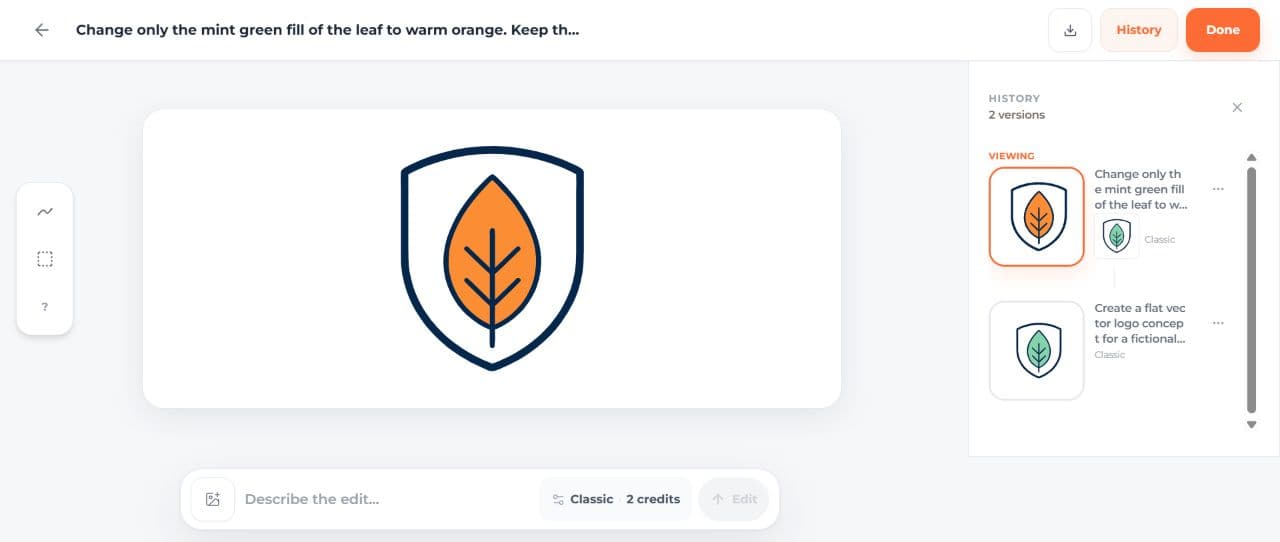
Open the archive's README to find the chosen file, then compare the three SVGs at 48 and 128 CSS pixels in its review page. Notice how the tighter viewBox makes the AI edit appear larger. The editing guide explains the exact color and viewBox changes if you want to adapt the finish yourself.
Download a complete example handoff
Download the message-icon handoff archive for a smaller example you can edit in a text editor. This hand-coded envelope moves from a coral outline to teal, then adds an accessible title and description. The three files share the same geometry, making the version changes easy to follow.
| Included file | Purpose |
|---|---|
BRIEF.md | Target size, palette, geometry and acceptance criteria |
editing-v1-source.svg | Starting envelope with a coral outline |
editing-v2-manual-color.svg | Exact teal color replacement; unchanged geometry |
editing-v3-manual-final.svg | Standalone image semantics added |
FEEDBACK.md | What changed in each version and why |
README.md | Which file to use and how to embed it |
review.html | All versions at 24, 48 and 128px on light and dark backgrounds |
VERIFICATION.md | File checks and size-review notes |
SHA256SUMS | File integrity values for the delivered package |
LICENSE.txt | Reuse terms for the example files |
Extract the ZIP, read README.md, then open review.html. Keep the SVG files beside that page so its relative links work. You can compare all three versions locally without signing in.
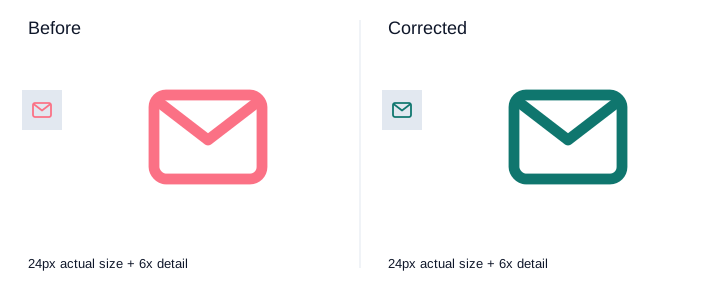
Version 2 changes only the stroke color. Version 3 adds a title and description while keeping the same viewBox and geometry. The final file contains one foreground rectangle and one path, with no embedded image or font dependency. The editing guide shows the complete final source.
How to adapt the archive to a real product project
Save the original generation as source-product.svg, the AI-edited result as edited-product.svg, and your manual finish as final-manual.svg. Keep the prompt and settings beside each version. Download the files and open them in the app or page that will use them; this catches missing resources and sizing problems before delivery.
Replace the sample brief with your project's requirements and add a short note for each revision. Name the person who will approve the design and mark the candidate ready for review. Once approved, identify that exact version in the README.
Understanding Workflow Fundamentals
The Complete SVG Creation Lifecycle
Brief → source → review → revision → final check → delivery → archive. At each stage, save what the next person needs: the brief, artwork, feedback, selected version or usage instructions. This keeps decisions attached to the files they affect.
Workflow Design Principles
Define the requirements early, preserve useful versions and check the final file in context. Automate repeatable tasks such as naming, packaging and checksums. Spend design time on unresolved questions rather than generating extra variations after a direction is settled.
Phase 1: Conceptualization and Planning
Discovery and Requirements
Ask where the asset will appear, who approves it, what sizes and backgrounds it must support, and which formats the receiving system accepts. Clarify whether lettering must remain editable and whether the deliverable may contain embedded raster content.
Creative Brief Development
The sample brief requests a 24 × 24 viewBox, teal #0f766e, rounded 1.8-unit strokes and a transparent background. Its pass conditions are observable. Replace vague “make it professional” criteria with the specific appearance, behavior and delivery requirements that matter for your project.
Inspiration and Reference Gathering
Use owned or permissioned references. Save the original reference and note which feature informs the brief. Keep customer material private unless separately authorized for publication. A reference can guide a design without becoming part of the public handoff package.
Phase 2: Rapid Concept Exploration
Divergent Ideation
Use the AI SVG Creator to explore directions that answer different parts of the brief. For a messaging icon, you might compare an envelope with a speech bubble before refining either. Save each candidate with its prompt, and choose how much time and how many credits to spend on exploration.
Concept Evaluation and Selection
First check task fit, then target-size appearance, then structural requirements. Keep rejected candidates with a short reason. A concept that looks good but needs unknown fonts or loses essential detail at 24px should not silently become the final deliverable.
Stakeholder Concept Presentation
Present the file in its intended context with a focused question: “Which outline is clearer in this 24px toolbar?” Show the same size and background for each candidate so the comparison is fair. For more presentation examples, see SVG creator for designers workflows.
Phase 3: Iterative Development and Refinement
Development Workflow
Preserve source, make one meaningful change, check the result, then give it a new version. For the sample, palette correction is separate from metadata. For an AI project, preserve each generated or AI-edited result before manual finishing.
Feedback Integration
Turn feedback into a visible change. “Use the specified teal” becomes a replacement with #0f766e; “make it feel better” needs a follow-up about shape, spacing or color. Record which changes the reviewer accepted and which can wait.
Version Control and Organization
Use stable names that identify the asset, version and state. Treat “final” as a recorded decision rather than a suffix added automatically. The archive uses these explicit versions:
message-icon-handoff/
  BRIEF.md
  editing-v1-source.svg
  editing-v2-manual-color.svg
  editing-v3-manual-final.svg
  FEEDBACK.md
  README.md
  review.html
  VERIFICATION.md
  SHA256SUMS
  LICENSE.txt
If another revision arrives, add v4 and update the README's chosen version. Preserve v3 so a reviewer can trace the change or roll back. Rapid SVG prototyping covers earlier exploration before the delivery stage.
Phase 4: Quality Control and Validation
Technical Quality Checklist
- The exact delivered file opens as SVG XML.
- The viewBox and visible bounds match the intended use.
- Colors, transparency, text and embedded images meet the brief.
- Referenced fonts, files and IDs resolve in the receiving context.
- The final version has an appropriate accessible embedding.
- The archive opens and contains its README and all linked files.
- Source, AI edits and manual edits are labeled separately.
Context Testing
Review at actual CSS sizes and browser zoom, not only in a magnified editor. In the sample review page, the 24px row is the primary UI check and the 128px row exposes detail. The teal stays fixed on a dark surface; if the project needs a lighter theme variant, create and review it explicitly.
Stakeholder Final Review
Name the exact file and show it in its intended layout when requesting approval. Keep the reviewer's decision and date with that version. For shared review practices, see the collaborative SVG creation guide.
Phase 5: Production and Delivery
Export and Format Preparation
Ask which formats the receiver needs, then save and open each exported file before packaging it. Include the editable SVG when later changes are likely. If you also supply a PNG, label its pixel dimensions so it is easy to choose the right version.
Implementation Support
Provide a minimal working embedding example and state its context. A labeled button can treat the image as decorative:
<button type="button" aria-label="Open messages">
  <img src="editing-v3-manual-final.svg" width="24" height="24" alt="" />
</button>
For informative imagery, choose meaningful alt text instead. If you inline multiple copies, give each title and description a unique ID. The README also explains why an external SVG does not inherit the parent page's currentColor.
Project Archival
Keep the brief, source, revisions, final file, review notes, usage instructions and any licenses together. Add checksums after assembling the deliverable; update them if a file changes. Preserve the delivered archive as a snapshot so a later edit cannot overwrite what the receiver has.
Workflow Optimization Strategies
Time Tracking and Analysis
Track generation time, active design work and time waiting for feedback separately. If delivery regularly stalls at review, a clearer brief or a scheduled decision may help more than faster drawing tools. Compare similar projects before changing the process.
Template and System Development
Reuse the archive's folders and document structure for your next project. Start with a fresh brief, version list and review checklist. Leave a check open until someone has completed it, and name the current candidate in the README.
Tool Stack Optimization
Use Text to SVG AI for a new visual direction and a vector or text editor for precise finishing. Share the chosen files and review notes through your team's preferred storage or project tool. Keep one clearly identified version as the current candidate.
Common Workflow Problems and Solutions
Problem 1: Endless Revision Cycles
Revisit the brief and identify which acceptance condition still fails. Set a decision owner and separate essential corrections from optional variation. Preserve the current candidate instead of losing it in an unlimited sequence of unrelated changes.
Problem 2: Late-Stage Major Changes
Record the new requirement, which approved files it affects and when the revised version will be reviewed. Keep the previous deliverable so the team can compare the scope of the change and return to it if needed.
Problem 3: Technical Issues Discovered Late
Open an early candidate in the receiving environment before polishing every detail. Check fonts, IDs, raster content and clipping while revisions are still easy. Repeat a check when a relevant change could invalidate its earlier result.
Problem 4: Inefficient Tool Usage
Look for a repeated task to simplify, such as file naming, color replacement or archive creation. Save the current files and notes before switching tools, then check that the new tool preserves the features your project uses.
Advanced Workflow Patterns
Parallel Variation Development
Develop alternatives in parallel when they explore different directions. Give each its own source file and notes, then compare them at a similar level of detail. This makes the concept easier to judge without being distracted by uneven polish.
Modular Component Design
Keep shared visual rules explicit across related assets. Reusing a source shape helps consistency, but each assembled icon still needs a target-size check. Preserve IDs carefully when multiple SVGs share a document.
Agile/Iterative Workflow
Use a short cycle: create a candidate, place it in context, gather feedback and choose the next change. Close each cycle by naming the selected version and the question the next revision should answer.
Frequently Asked Questions
How much time should go into concepts? Set a budget based on the brief's open questions. If the subject and style are already agreed, spend more time on refinement and placement than on new directions.
How many concepts should I present? Present candidates that answer different meaningful questions. Avoid generating extra variations simply to reach a quota.
How can I speed up delivery? Reuse file structures and automate checksum or archive creation. A README naming the final file and its intended use also reduces follow-up questions.
Should I show work in progress? Show it when early feedback will resolve a consequential uncertainty. Label its state and ask a focused question.
How do I handle vague feedback? Ask which visible feature fails the brief, then record the intended change before editing.
How should long projects be organized? Keep immutable delivered snapshots plus working versions and a README naming the current candidate.
How can review be collaborative? Share the same version and comparison page through your team's chosen tools. Give reviewers a focused question and keep their decisions beside the relevant file.
When should I use AI versus manual work? Use AI for a new visual direction and manual editing for changes requiring exact source control. Keep the boundary visible in the version log.
Conclusion: Workflow as Competitive Advantage
A handoff is complete when the receiver can find the chosen file, understand the changes and use it in the intended layout. Start a new concept with the SVG creator, then carry the brief, useful revisions and clear instructions through to delivery.
Related workflow resources: