SVG Browser Compatibility Guide 2026: Support Matrix and Fallback Strategies
By SVG AI Team
ai svg generatorbrowser compatibilitysvg supportweb developmentsvg generator
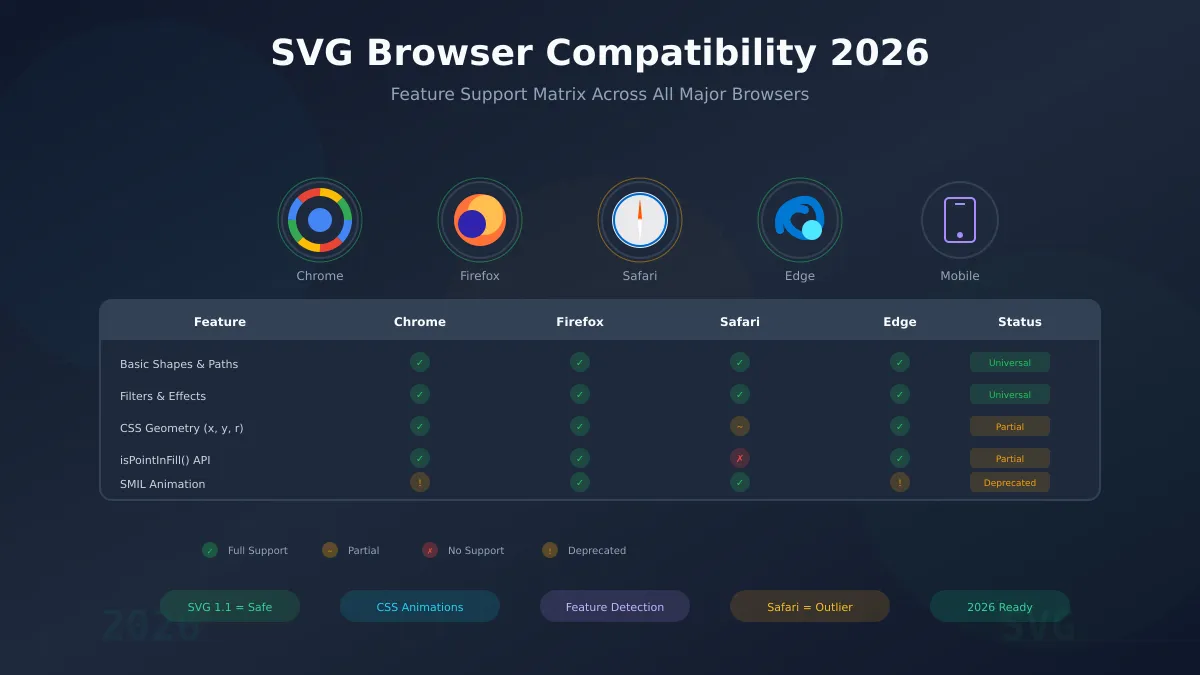
Browser compatibility remains one of the most critical considerations when working with SVG graphics in 2026. While the core SVG specification enjoys universal support, newer features from SVG 2.0 and advanced CSS integration require careful testing across different browsers. Understanding what works everywhere versus what needs fallbacks is essential for delivering consistent experiences to all users.
This comprehensive guide covers the current state of SVG browser support, providing practical feature detection techniques and fallback strategies. Whether you're creating graphics with our AI SVG Generator or hand-coding complex visualizations, this matrix will help you make informed decisions about which features to use in production.
The 2026 Browser Landscape
The browser ecosystem in 2026 is dominated by evergreen browsers that automatically update, which has dramatically improved baseline SVG support. However, significant differences remain, particularly with Safari.
Market Share Reality
Desktop Browsers (2026 estimates):
- Chrome: ~65% market share
- Safari: ~18% market share
- Edge: ~10% market share
- Firefox: ~5% market share
- Others: ~2%
Mobile Browsers:
- Safari (iOS): ~25% of all mobile traffic
- Chrome Mobile: ~65% of all mobile traffic
- Samsung Internet: ~5%
- Others: ~5%
The Safari Factor
Safari consistently lags behind Chromium-based browsers in implementing newer SVG features. This matters significantly because:
- iOS lock-in: All browsers on iOS use WebKit, meaning Safari's limitations affect Chrome, Firefox, and every other browser on iPhones and iPads
- Designer audience: Many design professionals use macOS, making Safari testing essential
- High-value users: iOS users often represent premium customer segments
When using an SVG generator for production work, always test output in Safari to catch compatibility issues early.
Evergreen Advantages
The good news is that evergreen browser updates mean SVG support improves continuously without requiring users to manually update. Features that were experimental 12 months ago may now have broad support. Always verify current compatibility data when planning new projects.
Core SVG Feature Support Matrix
These SVG 1.1 core features enjoy universal support across all modern browsers. You can use them confidently without fallbacks.
Universal Support (Safe to Use Everywhere)
| Feature | Chrome | Firefox | Safari | Edge | Mobile |
|---|---|---|---|---|---|
Basic shapes (rect, circle, ellipse, line) | Full | Full | Full | Full | Full |
| Paths with all commands (M, L, C, S, Q, T, A, Z) | Full | Full | Full | Full | Full |
| Linear gradients | Full | Full | Full | Full | Full |
| Radial gradients | Full | Full | Full | Full | Full |
| Pattern fills | Full | Full | Full | Full | Full |
| Clipping paths | Full | Full | Full | Full | Full |
| Masks | Full | Full | Full | Full | Full |
| Filter primitives (blur, shadow, color matrix) | Full | Full | Full | Full | Full |
| Transformations (translate, rotate, scale, skew) | Full | Full | Full | Full | Full |
| Text elements | Full | Full | Full | Full | Full |
| Symbol and use elements | Full | Full | Full | Full | Full |
| Nested SVG elements | Full | Full | Full | Full | Full |
| Viewport and viewBox | Full | Full | Full | Full | Full |
For a deeper understanding of these fundamentals, see our SVG file format guide.
What This Means for Production
When your AI SVG Generator outputs graphics using these core features, you can deploy them immediately without compatibility concerns. The vast majority of SVG use cases fall within this safe zone:
- Logo graphics
- Icons and illustrations
- Infographics and charts
- Background patterns
- UI decorations
Advanced Feature Compatibility (SVG 2.0)
SVG 2.0 introduces modern capabilities, but browser support varies. Here's the detailed breakdown as of February 2026.
CSS Geometry Properties
One of SVG 2.0's most useful additions is the ability to control geometric attributes via CSS:
/* SVG 2.0: Control geometry with CSS */
rect {
  x: 10px;
  y: 20px;
  width: 100px;
  height: 50px;
  rx: 8px;
}

circle {
  cx: 50%;
  cy: 50%;
  r: calc(25% - 10px);
}
| Property | Chrome | Firefox | Safari | Edge |
|---|---|---|---|---|
x, y on rect | Full | Full | Partial | Full |
width, height on rect | Full | Full | Partial | Full |
rx, ry on rect | Full | Full | Partial | Full |
cx, cy, r on circle | Full | Full | Partial | Full |
Safari limitation: Safari supports basic CSS geometry but may not properly handle calc() values or CSS custom properties in these contexts.
paint-order Property
The paint-order property controls the order in which fill, stroke, and markers are painted:
.outlined-text {
  fill: white;
  stroke: black;
  stroke-width: 4px;
  paint-order: stroke fill markers;
}
| Browser | Support |
|---|---|
| Chrome | Full |
| Firefox | Full |
| Safari | Full |
| Edge | Full |
This property has excellent support and is safe for production use. It's particularly valuable for creating outlined text effects.
Hit Testing Methods
SVG 2.0 introduces precise hit testing methods:
const path = document.querySelector('path');
const point = new DOMPoint(100, 50);

// Check if point is inside the fill
if (path.isPointInFill(point)) {
  console.log('Point is inside the shape');
}

// Check if point is on the stroke
if (path.isPointInStroke(point)) {
  console.log('Point is on the stroke');
}
| Method | Chrome | Firefox | Safari | Edge |
|---|---|---|---|---|
isPointInFill() | Full | Full | None | Full |
isPointInStroke() | Full | Full | None | Full |
Safari limitation: These methods are not implemented in Safari/WebKit as of 2026. Use alternative hit testing approaches for cross-browser compatibility.
For a complete feature comparison between SVG versions, see our SVG 1.1 vs SVG 2.0 comparison.
Animation and Interactivity Support
Animation capabilities vary significantly across browsers, with SMIL being the most contentious area.
SMIL Animation Status
SMIL (Synchronized Multimedia Integration Language) animations were once deprecated in Chrome but remain functional:
<circle r="10">
  <animate attributeName="r" values="10;20;10" dur="2s" repeatCount="indefinite"/>
</circle>
| Browser | SMIL Support | Status |
|---|---|---|
| Chrome | Works | Deprecated (but functional) |
| Firefox | Full | Recommended |
| Safari | Full | Recommended |
| Edge | Works | Deprecated (but functional) |
Recommendation: While SMIL still works, prefer CSS animations or JavaScript (Web Animations API) for new projects to ensure long-term compatibility.
CSS Animations (Recommended)
CSS animations work universally and integrate with existing CSS workflows:
@keyframes pulse {
  0%, 100% { transform: scale(1); opacity: 1; }
  50% { transform: scale(1.2); opacity: 0.8; }
}

.animated-element {
  animation: pulse 2s ease-in-out infinite;
  transform-origin: center;
}
| Feature | Chrome | Firefox | Safari | Edge |
|---|---|---|---|---|
| CSS transforms on SVG | Full | Full | Full | Full |
| CSS transitions on SVG | Full | Full | Full | Full |
| CSS keyframe animations | Full | Full | Full | Full |
| transform-origin | Full | Full | Full | Full |
Web Animations API
The JavaScript Web Animations API provides programmatic control:
const element = document.querySelector('.my-shape');

element.animate([
  { transform: 'scale(1)', opacity: 1 },
  { transform: 'scale(1.2)', opacity: 0.8 },
  { transform: 'scale(1)', opacity: 1 }
], {
  duration: 2000,
  iterations: Infinity,
  easing: 'ease-in-out'
});
| Browser | Support |
|---|---|
| Chrome | Full |
| Firefox | Full |
| Safari | Full |
| Edge | Full |
Feature Detection Techniques
Rather than browser sniffing, use feature detection to conditionally enable SVG 2.0 features.
JavaScript Feature Detection Patterns
// Detect CSS geometry property support
function supportsCSSGeometry() {
  const rect = document.createElementNS('http://www.w3.org/2000/svg', 'rect');
  return 'x' in rect.style;
}

// Detect hit testing methods
function supportsHitTesting() {
  const path = document.createElementNS('http://www.w3.org/2000/svg', 'path');
  return typeof path.isPointInFill === 'function';
}

// Detect vector-effect support
function supportsVectorEffect() {
  const rect = document.createElementNS('http://www.w3.org/2000/svg', 'rect');
  rect.setAttribute('vector-effect', 'non-scaling-stroke');
  return rect.getAttribute('vector-effect') === 'non-scaling-stroke';
}

// Use the detections
if (supportsCSSGeometry()) {
  document.documentElement.classList.add('css-geometry');
}

if (supportsHitTesting()) {
  document.documentElement.classList.add('hit-testing');
}
CSS @supports Queries
For CSS-based feature detection:
/* Progressive enhancement for paint-order */
@supports (paint-order: stroke fill) {
  .outlined-text {
    paint-order: stroke fill markers;
    stroke: black;
    stroke-width: 4px;
    fill: white;
  }
}

/* Fallback without paint-order support */
@supports not (paint-order: stroke fill) {
  .outlined-text {
    /* Use a different approach or simpler styling */
    fill: white;
    filter: drop-shadow(1px 1px 0 black)
            drop-shadow(-1px 1px 0 black)
            drop-shadow(1px -1px 0 black)
            drop-shadow(-1px -1px 0 black);
  }
}
Comprehensive Detection Module
Here's a complete feature detection module for SVG capabilities:
const SVGFeatures = {
  // Core detection
  cssGeometry: (() => {
    const rect = document.createElementNS('http://www.w3.org/2000/svg', 'rect');
    return 'x' in rect.style;
  })(),

  hitTesting: (() => {
    const path = document.createElementNS('http://www.w3.org/2000/svg', 'path');
    return typeof path.isPointInFill === 'function';
  })(),

  paintOrder: CSS.supports('paint-order', 'stroke fill'),

  vectorEffect: (() => {
    const line = document.createElementNS('http://www.w3.org/2000/svg', 'line');
    line.style.vectorEffect = 'non-scaling-stroke';
    return line.style.vectorEffect === 'non-scaling-stroke';
  })(),

  // Report support level
  getSupportLevel() {
    const features = [this.cssGeometry, this.hitTesting, this.paintOrder, this.vectorEffect];
    const supported = features.filter(Boolean).length;
    return {
      full: supported === 4,
      partial: supported >= 2,
      basic: true,
      score: `${supported}/4`
    };
  }
};

// Usage
console.log(SVGFeatures.getSupportLevel());
// { full: false, partial: true, basic: true, score: "3/4" }
Fallback Strategies
When advanced features aren't available, implement graceful fallbacks.
Progressive Enhancement Approach
Start with universally-supported features and enhance for capable browsers:
<svg viewBox="0 0 100 100">
  <!-- Base: Works everywhere -->
  <rect x="10" y="10" width="80" height="80" rx="8" fill="#3b82f6"/>

  <!-- Enhanced: CSS geometry for supported browsers -->
  <style>
    @supports (rect { x: 10px; }) {
      .dynamic-rect {
        x: var(--rect-x, 10px);
        transition: x 0.3s ease;
      }
    }
  </style>
</svg>
PNG Fallback for Legacy Contexts
For contexts where SVG support is uncertain (email, legacy systems):
<picture>
  <source srcset="graphic.svg" type="image/svg+xml">
  <img src="graphic.png" alt="Fallback image">
</picture>
Hit Testing Fallback
When isPointInFill() isn't available:
function isPointInPath(path, x, y) {
  // Try native method first
  if (typeof path.isPointInFill === 'function') {
    return path.isPointInFill(new DOMPoint(x, y));
  }

  // Fallback: Use bounding box (less precise but universal)
  const bbox = path.getBBox();
  return x >= bbox.x && x <= bbox.x + bbox.width &&
         y >= bbox.y && y <= bbox.y + bbox.height;
}
For comprehensive performance optimization techniques that work across all browsers, see our SVG performance optimization guide.
Testing Your SVGs Across Browsers
Cross-Browser Testing Tools
Cloud Testing Platforms:
- BrowserStack: Real device testing for all major browsers
- LambdaTest: Automated screenshot comparison
- Sauce Labs: Continuous integration friendly
Local Testing:
- Safari Technology Preview: Test upcoming WebKit features
- Firefox Developer Edition: Early access to new features
- Chrome Canary: Bleeding-edge Chromium features
Testing Checklist
When testing SVG graphics across browsers, verify:
- Visual rendering: Shapes, colors, and positions match expectations
- Animations: CSS and JavaScript animations perform correctly
- Interactions: Click handlers and hover states work
- Responsiveness: viewBox scaling behaves consistently
- Filter effects: Blurs, shadows, and color adjustments render properly
- Text rendering: Fonts load and display correctly
- Performance: No excessive CPU usage or jank
Automated Visual Regression Testing
// Example with Playwright
const { test, expect } = require('@playwright/test');

test('SVG renders correctly', async ({ page }) => {
  await page.goto('/my-svg-page');
  await expect(page.locator('svg.my-graphic')).toBeVisible();

  // Visual snapshot comparison
  await expect(page).toHaveScreenshot('svg-rendering.png', {
    maxDiffPixels: 100 // Allow minor anti-aliasing differences
  });
});
2026 Compatibility Best Practices
Based on the current browser landscape, here are the recommended practices for SVG development in 2026:
Do Use (Safe Everywhere)
- SVG 1.1 core features for all production graphics
- CSS animations and transitions instead of SMIL
- Feature detection instead of browser sniffing
- Progressive enhancement for SVG 2.0 features
- AI-generated SVGs from tools like our AI SVG Generator which produce clean, compatible output
Be Cautious With
- CSS geometry properties - test thoroughly in Safari
- SMIL animations - functional but deprecated in Chromium
- Shadow DOM with
<use>- inconsistent behavior - Advanced text features - font handling varies
Avoid for Production
isPointInFill()/isPointInStroke()without fallbacks- Untested SVG 2.0 features without feature detection
- Browser-specific hacks that may break with updates
- Assuming all iOS browsers differ - they all use WebKit
Mobile-First Considerations
Since mobile traffic often exceeds desktop:
- Test SVGs on actual mobile devices, not just emulators
- Consider touch target sizes for interactive SVG elements
- Test performance on mid-range devices, not just flagship phones
- Remember that iOS Safari represents a significant portion of mobile traffic
Related Resources
For deeper dives into specific topics covered in this guide:
- AI SVG Generator Complete Guide - Comprehensive introduction to AI-powered SVG creation
- SVG 1.1 vs SVG 2.0 Comparison - Detailed feature comparison between specifications
- SVG Performance Optimization - Techniques for fast-loading vector graphics
- SVG File Format Guide - Understanding the SVG specification fundamentals
Conclusion
SVG browser compatibility in 2026 is generally excellent for core features, with the main challenges appearing in SVG 2.0 additions and Safari-specific limitations. By focusing on the universally-supported SVG 1.1 feature set and using progressive enhancement for newer capabilities, you can create graphics that work flawlessly across all browsers.
The key takeaways:
- Core SVG features have universal support - use them confidently
- Safari is the compatibility outlier - always test there
- Feature detection beats browser detection - write future-proof code
- CSS animations are the safe path - prefer them over SMIL
- AI tools produce compatible output - our AI SVG Generator creates clean, cross-browser SVGs
By following the strategies outlined in this guide, you can deliver consistent SVG experiences to all users regardless of their browser choice. Start creating browser-compatible vector graphics today with our SVG generator - no design skills required, and the output works everywhere.