A designer can like a preview while a developer still has work to do on the download. In our Fieldnote example, the bookmark and compass looked usable, but neither generated color exactly matched the brief. A later AI recolor also changed the paths and framing.
That makes the exported file a useful starting point for choosing an AI SVG generator. Test the task you need to finish, including the revisions and integration, before deciding whether the workflow fits.
This guide is published by SVG AI. Its hands-on findings come from our own product examples on September 14, 2026. It does not rank competitors we have not tested. An earlier version included numerical ratings, generation-time comparisons and a claim of more than 50 test outputs without supporting records; those claims have been removed.
Start with the deliverable
Choose one small, concrete task: a 24-pixel navigation icon, a two-color brand mark, or three product badges. Write down what would make the finished file acceptable.
| Your task | Check the actual file for | Useful next step |
|---|---|---|
| Interface development | Meaning at the displayed size, dimensions, colors and loading cost | Put the SVG in the real component |
| Brand design | Exact palette, recognizable silhouette and useful light/dark versions | Compare variants at their intended sizes |
| Small-team delivery | Revision effort, export access and a clear final file | Hand the package to someone who did not generate it |
An arbitrary score such as “9.5 for code quality” cannot tell you whether a particular compass symbol remains readable in your navigation.
What this example actually tested
The Fieldnote bookmark was generated with Classic, one SVG and a transparent background. The dashboard displayed two credits for the generation. A separate recolor used another two credits. The original and AI revision were both downloaded and inspected.
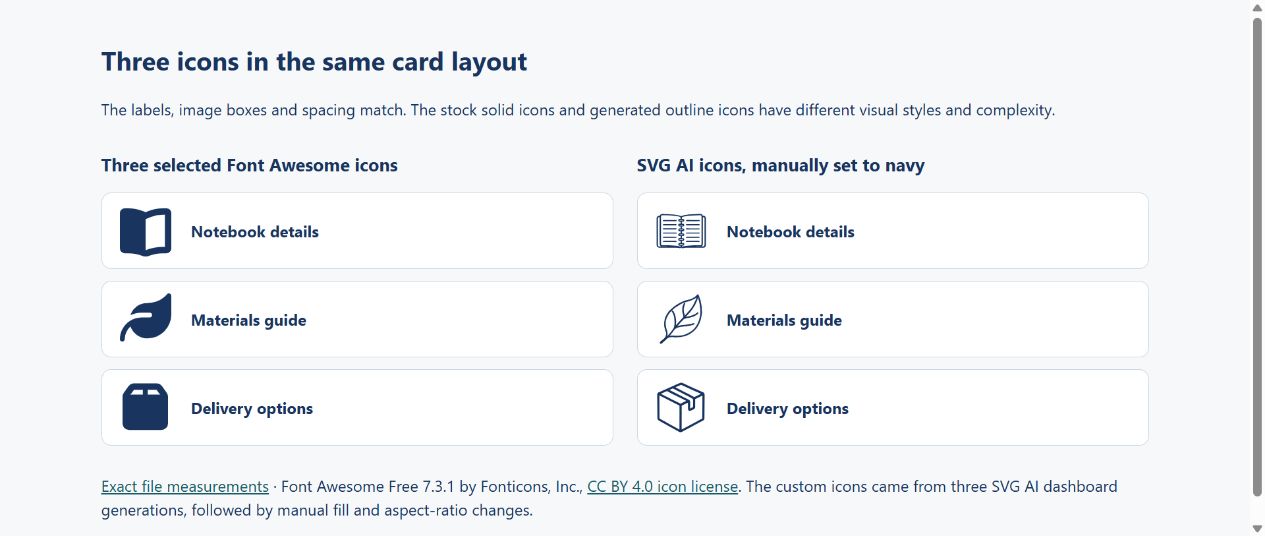
Three additional Classic generations produced a notebook, leaf and parcel. Each used the same outline-style wording with a different subject, no image reference, and two displayed credits. They were placed in matching 52-pixel boxes. This is a small demonstration, not a representative benchmark of every model or possible prompt.
The five-file-check tutorial provides the full Fieldnote prompt, downloadable originals and inspection steps.
For developers: integrate one download
The original Fieldnote file contains three paths and no embedded image. It is 2,552 bytes. Its preserveAspectRatio="none" setting lets it stretch when its display box has different proportions.
The manual brand version preserves the original path coordinates, changes the fills to the requested colors and uses proportional fitting. Those are manual changes, not evidence that the generation followed every constraint.

For a set of ordinary interface symbols, also try a maintained icon library. The same-layout comparison places our generated notebook, leaf and parcel beside Font Awesome Free 7.3.1's book, leaf and box. The three Font Awesome SVGs total 1,881 raw bytes; the generated originals total 31,829. Different shapes and solid-versus-outline detail affect this comparison. It does not measure a complete library bundle or page-load speed.
See the Font Awesome comparison and licensed downloads for the exact files. Prefer the stock symbols when they already express the action clearly; consider custom generation when a specific visual idea is missing.
For designers: test the revision you expect to make
The Fieldnote prompt requested navy #18345F and orange #F97316. The original used #183862 and #F76F1B. Asking the editor to change only the orange to teal #0F766E produced #118B81, and changed the navy, geometry and framing too.
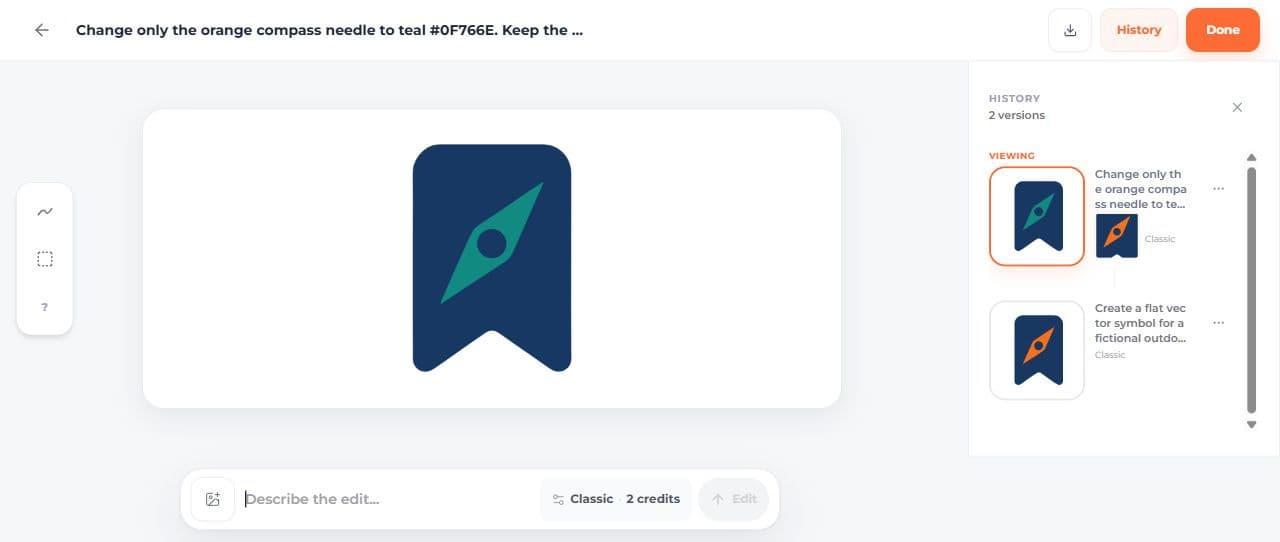
A visual revision may be useful even when it does not preserve every coordinate. For an exact brand-color substitution, editing the fill values gave us the requested palette while retaining the original paths. The light, dark and monochrome exercise shows how those variants behave in actual placements.
Compare the original and revision side by side. Check the silhouette, interior spaces and proportions as well as the requested change.
For small teams: measure usable results
Count the whole task. Four initial generations and three AI edits in this set consumed 14 displayed credits. Manual cleanup, file inspection and layout work were additional effort; no elapsed-time or savings study was performed.
The three generated badges also differed in complexity. The notebook contained 21 paths and six fill values, the leaf one path, and the parcel two paths including a gradient. A shared prompt did not make them a finished matching set.
The ecommerce exercise makes their colors consistent manually and places them beside descriptive labels. Use that kind of finished application to judge suitability, rather than counting generated files as approved assets.
Comparing another tool fairly
Run your same brief in each candidate. Keep its original export, note the selected model and access conditions, and perform the same revision. Avoid comparing one product's edited result with another's first attempt.
Record four answers:
- Does the downloaded file meet the actual task?
- What correction was needed?
- Can the next person edit and use it?
- What did the completed task consume?
For a current overview that distinguishes hands-on examples from vendor documentation, see three AI icon workflows.
Make the choice at the point of use
Choose the workflow that produces a usable result for your particular constraint. A standard library can suit familiar UI actions; a manually constructed SVG can suit a precise simple shape; generation can supply a custom visual concept that you then inspect and refine.
The small-team trial and handoff guide provides a concrete way to organize that decision without assuming a promised return on investment.